

Are you planning a concert or theater performance and want to boost your ticket sales? Even with a small budget, a Meta campaign is worthwhile. On Meta, you can reach everyone who's interested in your event. We'll show you what to look out for!
What It’s About
|
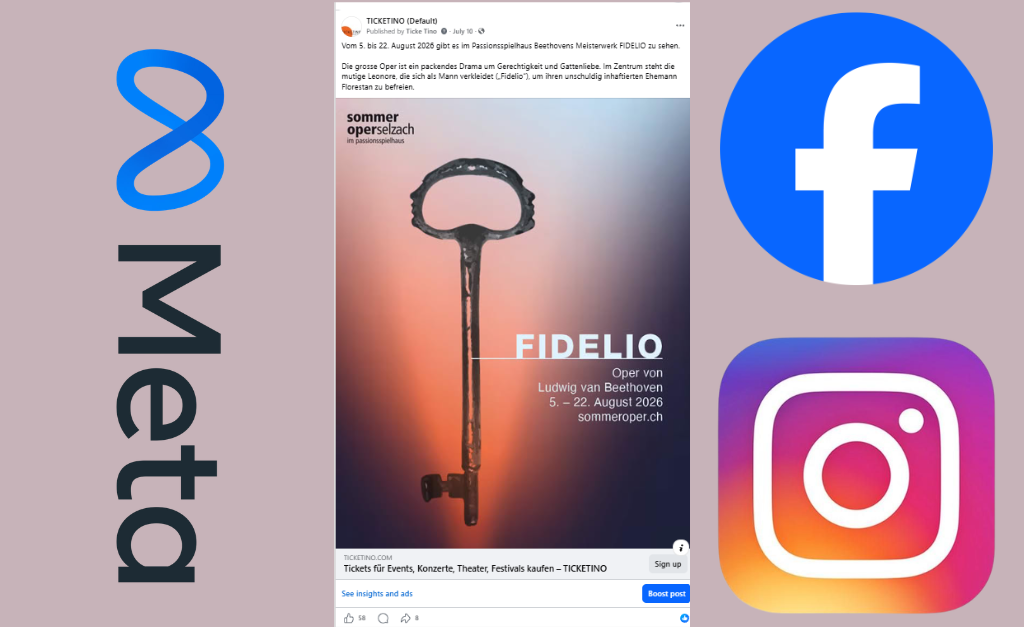
Use Facebook and Instagram now to effectively promote your event. With Instagram (4.3 million users in Switzerland/Dec. 2025) and Facebook (2.6 million users in Switzerland/Dec. 2025), Meta reaches a large share of the Swiss population and collects personal data from them.
Even with a small budget, you can benefit from the data and reach of the US tech company. Compared to traditional advertising media such as posters or newspaper ads, a Meta campaign lets you influence who sees your ad.
Where do you create your Meta campaign?
If you don't already have one, first create a Meta Business Portfolio (business page). You can find instructions here if needed. Then add a payment method (credit card).
You can now create the campaign in various ways — for example, by boosting a regular post, via Ads Manager, or via the Ad Center.
Ads Manager gives you more setting options. However, the simpler Ad Center is usually sufficient for getting started with Meta campaigns. This guide is therefore based on that.
How do you get to the Ad Center?
On desktop, go to Facebook and log in. Then switch to your Business Portfolio and click "Ad Center" in the left-hand menu. If you'd rather run the ad from your mobile device, open the Facebook app and switch to your Business Portfolio there. In the Professional Dashboard, scroll to the "Tools" section, where the Ad Center is listed.
How do you start your campaign?
In the Ad Center, you can boost a post on Meta with one click on "Advertise." To do this, click "create new ad".
What advertising objective are you pursuing?
First, you need to determine which objective you want to pursue with the Meta campaign. Specifically, you want to boost ticket sales for your event, so you select "Get more bookings". With this objective, Meta shows the post to users who are highly likely to book a ticket for your event.
What does your ad consist of, and how do you design it?
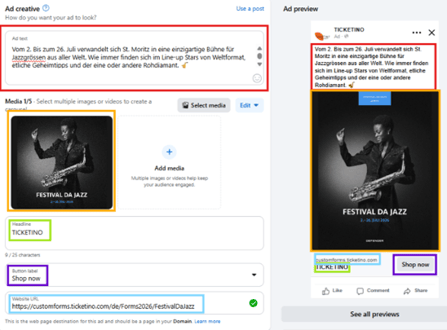 Under Ad Creative, you can design the ad. Under Ad Text, you craft your ad copy for your event. Describe in a few words what makes your event unique. Also add a Headline. Meta recommends 50 to 150 characters for the primary text. According to the Ad Center, 25 characters is the maximum for the headline. Enter your ticket sales page as the Website URL. Set the button label to "Shop now".
Next, choose one or more media items. You can upload a maximum of 5 images or videos. Meta creates creatives for various placements from these. If several are uploaded, Meta combines these media in the ads. So never use the same image in different formats.
Tip: Select Advantage+ creative so Meta continuously optimizes the ad using AI.
What formats are recommended for a Meta campaign?
For placements in the Facebook and Instagram feed as well as the Collection, a media item with an aspect ratio of 4:5 is needed. For a single image, this is typically 1080 × 1350 px.
Reels and Stories have an aspect ratio of 9:16. Here, videos with a format of 1080 × 1920 px are recommended, for example.
The Carousel uses media with a 1:1 aspect ratio.
You can find more information on formats here.
How do you define your target audience?
Defining your target audience is of central importance. There's a lot you can adjust; we'll focus on the most important points.
First, it's important that you geographically restrict the ad. Set the location and add a radius that matches your event's catchment area. Your ticket list can give you clues about the catchment area.
Next, define the age of your target audience and add relevant interests for your target audience.
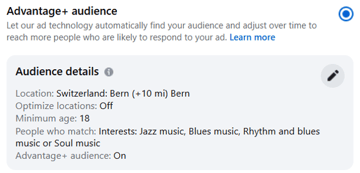
For example, if you want to promote a jazz concert in Bern, select Bern + 10 miles as the location. Add "Jazz Music" as well as the related genres "Blues Music", "Rhythm and Blues Music", and "Soul Music" as interests. Leave the minimum age at 18.
Tip: Also select Advantage+ audience so Meta optimizes your target audience using AI.
How do you determine the duration of your ad?
Which users your ad is shown to is determined by Meta based on an algorithm. The algorithm learns over time. According to the advertising agency Hanno Fässler, Meta needs a minimum learning phase of 50 to 75 conversions or one week without changes. The campaign only reaches its maximum effectiveness after the learning phase. So ideally, let the ad run over several weeks and, if necessary, increase the intensity in the days before the event. Important: Don't forget to stop the campaign once you're sold out, and set the campaign end date to no later than the event date so you don't spend money unnecessarily.
How do you determine your campaign budget?
Running ads on Meta isn't free. However, you can already reach thousands of potential customers with just a few hundred francs. With our "Get more bookings" campaign objective, there's a minimum daily budget of 2 CHF. The advertising effect naturally increases with a higher budget. You can find more information on budget here.
Tip: Select "Advantage+ placements." Within your budget parameters, Meta will maximize the number of users who see the ad across the various platforms.
How do you monitor the success of your Meta campaign?
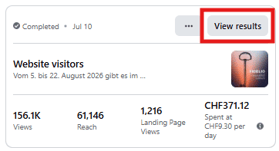 You can continuously check the success of your campaign in the Ad Center. This applies to both active and past campaigns. Detailed reports help you continuously optimize your advertising activities.
With these two tips, you can further boost your ticket sales:
Connect your ticket shop with a Meta Pixel and make this data available to your Meta campaign. Based on this data on website visitors' search behavior, Meta further refines your campaign's target audience.
Like all products, ticket presales also have a lifecycle. Properly timing your marketing activities further boosts presales.
Now you're ready for your Meta campaign. The TICKETINO team wishes you great success with your event!
Are you still looking for a ticketing partner for your event?
Contact us at marketing@ticketino.com or call us from
8 a.m. to 6 p.m. at +41 43 500 40 80 (CH) or +49 30 201 696 006 (EU).
You can also schedule a phone appointment. We look forward to hearing from you!