

Starting now, the popular shop plugin also supports seat-specific ticket sales. Present the entire purchasing process on your website, including seating plan, payment, and checkout.
What It’s About|
|
Do you want to integrate your ticket sales seamlessly into your website? Give your customers the option to purchase their tickets without ever leaving your site? Request fewer order details, and more? Then you should definitely give the shop plugin a try.
The following functionality was added recently:
-
Seating plan:
The shop plugin can now display seating plans as well. This means your customers can book seat-specific events directly on your website.
.png?width=1024&height=627&name=BLOGLISTING_GUESTMNGMT%20(23).png)
-
Integrated configurator:
Simple modifications to the shop plugin can now be made directly in the cockpit. This applies to functional settings such as default language, display of fields for promo code entry, collection of customer information, dependencies between ticket categories, and more.
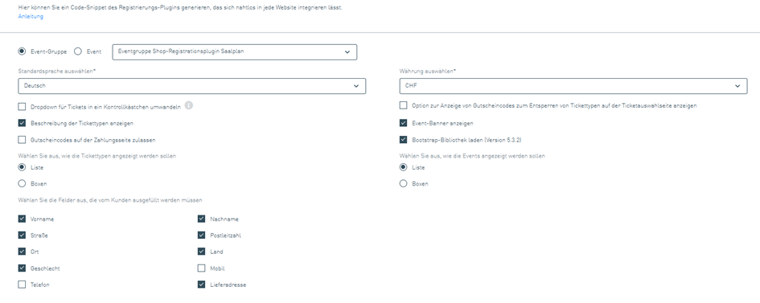
In addition, visual settings such as colors and fonts can also be customized.
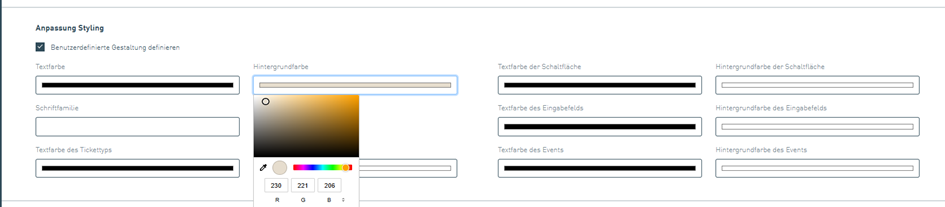
This allows you to customize your ticketing solution according to your preferences without having to edit the source code.
-
Event groups:
In addition to individual events, event groups can also be integrated via the shop plugin. There are different display options for the events (currently: list or boxes; calendar and more coming soon). Settings for fonts or colors are applied from the event group level to the individual events and tickets. You can check out the shop plugin here and place a free test order:

Additional tips to wrap up:
- For more information, usage examples, or more complex modifications to the shop plugin, we recommend downloading the “Step-by-Step Guide.”

- If you customize the colors of your shop plugin, it may be aesthetically beneficial to adjust the ticket categories in your seating plan accordingly (color of the dots on the seating plan). You can find this setting at the ticket level (Additional Settings / Color on Seating Plan).
- For more complex registration solutions, the “Advanced Form Tool” is recommended. Learn more about it in this post.
The TICKETINO team wishes you much success with your ticket sales!